The Project Value of Split-Screen Comparison in TVC Commercials
Split-screen comparison is a visual structure that places two or more images within the same frame simultaneously. It works well in TVC commercials for showing differences in functionality, usage scenarios, or user experience. At the project initiation stage, the brand needs to confirm that the split-screen comparison serves a real communication objective, not form for form's sake.
There are three criteria for judgment. First, whether product functions can be visually distinguished, such as the surface state before and after cleaning, the data interface before and after software processing, or the noise waveform when equipment is running. Second, whether the target audience can understand the difference between the left and right frames within a few seconds; if the audience needs to watch repeatedly to understand, the split-screen actually increases comprehension cost. Third, whether the distribution channel supports sufficient resolution and aspect ratio, since the composition logic for vertical and horizontal split-screens is completely different.
The brand side should prepare a feature comparison checklist during the project initiation phase, listing at least three sets of comparison dimensions, each including comparison items, expected visual differences, available assets, and shooting conditions. The production team should use this checklist to determine which dimensions are suitable for live-action shooting, which require CGI or AIGC support, and which need post-production compositing. If more than half of the comparison items on the list cannot be stably reproduced in a real environment, the feasibility of the split-screen approach should be reconsidered.
The risk is that split-screen comparisons can easily overload the frame with information. The way to avoid this is to compress the comparison dimensions to three or fewer, keeping only one core difference point for each dimension. The exception is when the product itself has multi-dimensional synchronous changes, such as simultaneous changes in temperature, color, and form; in this case, three dimensions can be retained, but they must be distinguished with clear visual guide lines.
A general method for extracting split-screen creative ideas from research cases.
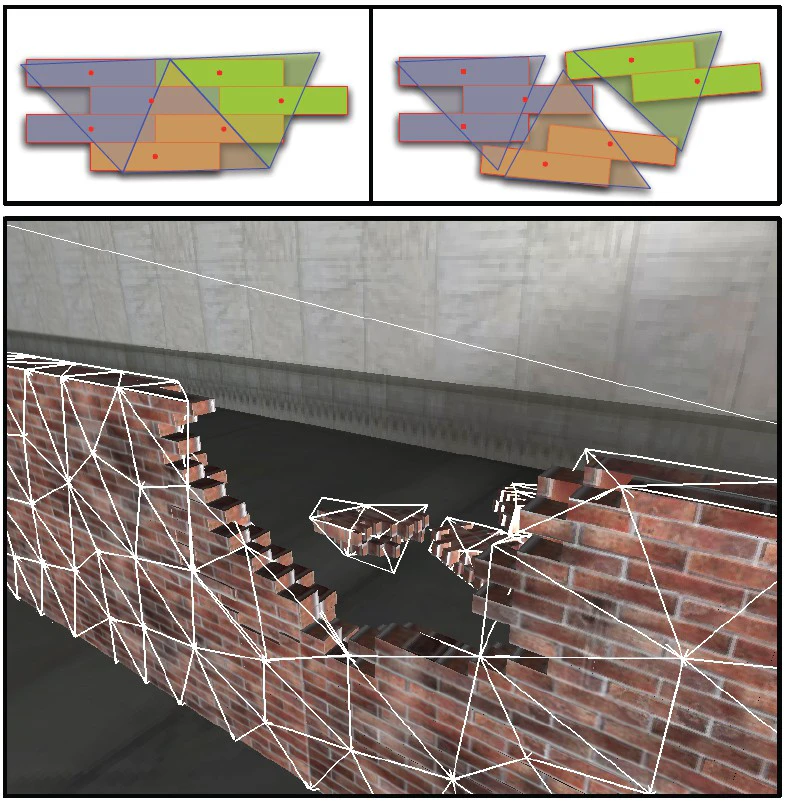
The research case DMM FEA for VFX demonstrates how physical simulation data can drive visual effects, with the core idea being to turn technical parameters directly into image changes. The insight this case offers for split-screen comparisons in TVC commercials is that comparison footage does not necessarily need to be shot in-camera and can instead generate visual differences based on data or algorithms.
The specific approach is for the brand side to first define quantitative metrics for the feature comparison, such as pressure distribution, temperature change, and velocity curves. The production team then generates corresponding visual elements based on these metrics, such as color gradients, particle density, and deformation levels. These visual elements are then applied separately to the left and right split screens to create a quantifiable comparison.
This method works when the product feature itself has measurable attributes, such as material strength, filtration efficiency, or signal coverage. It does not apply to subjective experience features such as sound quality, tactile feel, or comfort, which require real experience or actor performance to convey.
When deconstructing a reference case, the production team should focus on how it translates complex technology into easy-to-understand visuals, rather than copying its specific techniques. The brand side should avoid directly applying the physical simulation features from the case to its own product unless the product actually involves the relevant technology.
Pre-Shoot Checklist for Split-Screen TVC Commercials
Before the shoot, the brand side needs to provide the following materials. The actual product or high-precision models, at least two identical versions, so both sides of the screen can be filmed simultaneously. A written description of the feature comparison, including comparison items, expected differences, and usage environment. Reference images, which can be competitor ads, online videos, or hand-drawn sketches, to align the visual direction. A condition report of the shooting location, including space dimensions, power supply, lighting control, and weather impact.
The production team needs to confirm the following actions. The duration and transition method for each split-screen node in the script, whether it is a hard cut, slide, fade, or dynamic mask. The storyboard should mark the content, composition, movement direction, and visual focus of the left and right frames. The actor or product operator's blocking should avoid obscuring the split-screen dividing line. The lighting plan should ensure consistent brightness across both sides of the screen, unless a deliberate contrast between light and dark is intended.
Equipment selection should be based on split-screen requirements. If the left and right frames need to be shot simultaneously, a two-camera setup or one camera with a beam splitter may be needed. If the split screen is composited in post, a single camera shooting separately is sufficient, but camera position, focal length, and exposure settings must match between the two takes.
The risk is that it is difficult to ensure the left and right frames are fully synchronized on set. The solution is to use a timecode sync device or shoot a sync reference slate, then use that slate to align everything in post. The exception is when the left and right content does not require temporal sync, such as comparing static objects or independent scenes, in which case sync requirements can be relaxed.
Key Production Execution Points for Split-Screen TVC Commercials
During production, the director must clarify the primary and secondary relationship between the left and right frames. Most split-screen comparisons are symmetrical, but visual weight can favor the new product or feature. If the left and right content is asymmetrical—for example, the left shows the old product in use and the right shows the new product in use—action pacing must be consistent to avoid unbalancing the viewer's attention.
Lighting is key to split-screen comparison. Using different color temperatures or brightness levels in the left and right frames can strengthen the contrast, but the color temperature difference must suit the product. For example, cleaning products can use cool tones for the before state and warm tones for the after state, but overdoing it will make the result feel unrealistic.
Actions performed by actors or product operators should be designed to be repeatable. If the left and right frames show different results of the same action, the exact same action must be shot twice and later synchronized. If the left and right frames show different actions, ensure the action durations match to facilitate post-production editing.
For audio, split-screen comparisons usually use voice-over or background music, while ambient sound for the left and right frames can be recorded separately and mixed in post. If the left and right frames contain dialogue or sound effects, they must be recorded separately and clearly labeled.
After shooting, review the footage on set immediately. Check whether exposure, focus, and action match between the left and right frames, and reshoot promptly if they do not. For each take, record a slate log including shot number, content description, shooting parameters, and notes on any issues.
Post-Production Compositing and Visual Effects for Split-Screen TVC Commercials
In post-production, the editor must first synchronize the left and right frame assets onto the same timeline. Synchronization can be based on action, audio, or timecode. If the left and right frames are different scenes, ensure the switching rhythm is consistent—for example, switching comparison dimensions every 3 seconds.
During compositing, split-screen divider styles should be consistent. Common styles include vertical center lines, horizontal center lines, diagonal lines, curves, or dynamic masks. Dividers can be solid, dashed, or gradient, but they must remain clearly visible so viewers do not mistake them for cropping errors.
If the left and right frames require effects enhancement, such as adding particles, light effects, or data visualization elements, the effects team should generate them according to the script requirements. Effects intensity should be moderate and not overshadow the product itself. The effects style should align with brand tone, such as tech, natural, or professional.
Color grading is a key step in split-screen comparison. The colors of the left and right frames can be unified or deliberately differentiated. Unified colors suit emphasizing overall consistency, while differentiated colors suit highlighting functional differences. When grading, pay attention to skin tones, product colors, and background color accuracy to avoid color distortion.
In sound design, the left and right frames can each have their own sound effects, such as noise from the old product on the left and silence from the new product on the right. Voiceover should clearly explain the comparison dimensions and avoid repeating what is shown on screen.
Subtitles and graphic labels should be placed on both sides of the divider, and label content should be concise, such as before use and after use, or Product A and Product B. Subtitle fonts, sizes, and colors should be consistent and not obscure key visuals.
During post-production delivery, multiple versions need to be output. Landscape versions are used for TV and online. Portrait versions are used for social media. Each version must be checked for split-screen ratio compatibility, and reframed when necessary.
Acceptance Checklist and Delivery Standards for Split-Screen TVC Commercials
During acceptance, the brand side must check each item against the following checklist. First, whether all comparison dimensions in the script are fully presented without omission. Second, whether the content on the left and right sides accurately corresponds to product functions without misleading or exaggeration. Third, whether the split-screen dividing line is clear and does not affect viewing. Fourth, whether the image quality meets broadcast standards, including resolution, frame rate, and color depth. Fifth, whether the sound is clear and the proportions of voice-over, music, and sound effects are balanced. Sixth, whether subtitles and graphic annotations are accurate without typos or incorrect information.
The production team must provide a complete deliverables list. This includes the final master version, platform-adapted versions, subtitle files, audio stems, color-graded versions, VFX project files, and source material. Each file must be labeled with version number, date, and modification notes.
During acceptance, the brand side must conduct actual playback tests, checking aspect ratio, color, and sound on different devices. If split-screen misalignment, color deviation, or audio delay is found, the production team must fix it within a set deadline. After fixing, it must be resubmitted until acceptance is approved.
After delivery, the brand side should keep all source files and project files for future revisions or secondary distribution. The production team should provide operating instructions, such as how to replace subtitles, adjust volume, and export new versions.
The risk is discovering major issues during the acceptance stage, such as incorrect left/right screen content or unrealistic feature comparisons. The way to avoid this is thorough communication early on, shooting extra backup footage, and leaving time for revisions in post. If the problem is serious, reshoots or redoing effects may be needed, which will affect the schedule and budget, so preparation should be as thorough as possible.
Applicable Boundaries and Unsuitable Scenarios for Split-Screen TVC Commercials
Split-screen comparison is not suitable for every TVC commercial. The following situations are not suitable for split-screen. First, product features cannot be visually differentiated, such as service products, abstract concepts, or emotional experiences. Second, the target audience is unfamiliar with the split-screen format, such as elderly groups or young children, who may have difficulty understanding the left/right comparison logic. Third, the distribution platform limits the aspect ratio—for example, some social media platforms enforce vertical video, while split-screen comparison requires horizontal space, and vertical split-screen compresses content. Fourth, insufficient budget or schedule—split-screen comparison requires additional shooting and post-production costs; if the budget is tight, single-frame storytelling is preferable.
Applicable scenarios include: products with clear before-and-after differences, such as cleaning, repair, or enhancement. Products that need to be compared with competitors but cannot be named directly due to advertising law can be presented anonymously using split-screen. Products with multiple usage scenarios, such as home and commercial use, can be shown simultaneously with split-screen.
When a brand initiates a project, it should evaluate whether a split-screen comparison is the best way to express the message. Sometimes continuous footage or animation is more effective than a static split screen. For example, if a product feature changes over time, a time-series sequence is more intuitive than a side-by-side split screen.
The production team should also assess whether its technical capabilities can support split-screen effects. If the team lacks compositing or effects experience, consider outsourcing or simplifying the approach. Do not sacrifice content quality for the sake of form.
Recommended Next Steps
If you are preparing to launch a TVC commercial project and considering a split-screen comparison, we recommend completing the following three steps first. First, compile a list of product feature comparisons and clarify which differences are worth presenting in a split screen. Second, hold a creative meeting with the production team to discuss the visual approach and shooting feasibility of the split screen. Third, produce a simple split-screen test video, shot with a smartphone or ordinary camera, to quickly validate the effect. The test video does not need to be polished, but it can help determine whether the split screen is effective.
If the test results are positive, then move into the formal production process. If the test results are not good, promptly adjust the creative direction or abandon the split screen. Remember, split screen is only a tool; the ultimate goal is to help the audience understand the product's value.
If you're preparing for a TVC commercial project, start by organizing the brief, reference visuals, product or company materials, delivery platforms, and copyright scope, then visit theTVC Commercial Service page, so communication moves from abstract preferences to executable production boundaries.