Why Abstract Technology Needs a Three-Step Action
The most common problem with corporate promotional films is that the more advanced the technology, the less the audience understands. Abstract technology usually contains a large number of principles, parameters, and terms; presenting it directly creates a cognitive barrier. Breaking technology down into three steps essentially gives the audience a path to follow. Actions have a starting point, a process, and a result; the audience does not need to understand the internal mechanism, only the sequence of operations and the changes in effect.
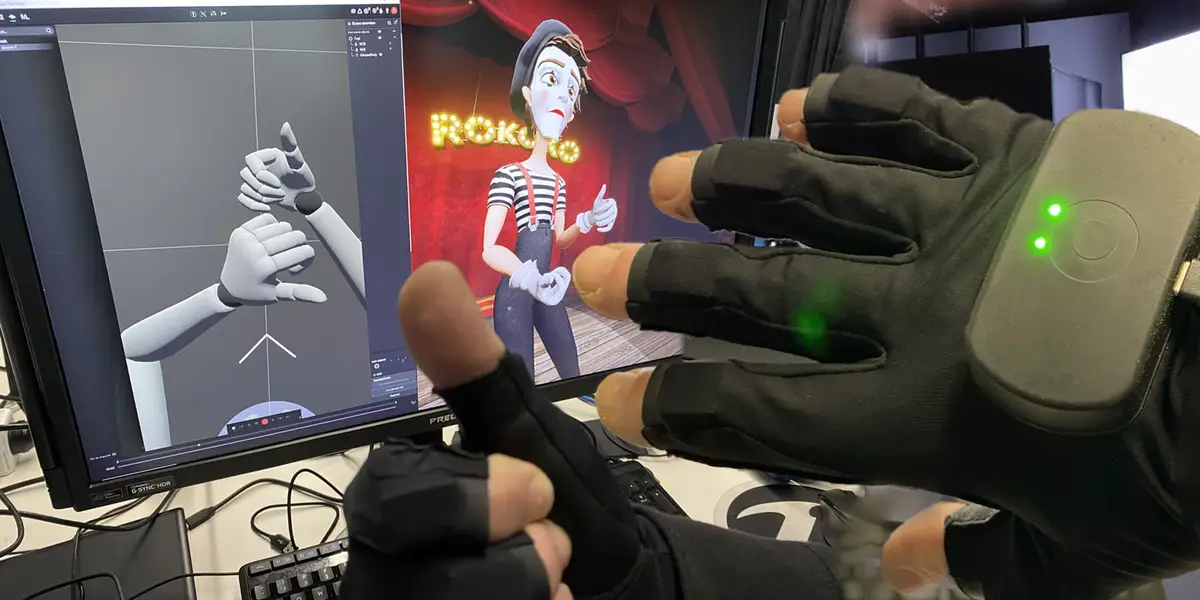
The key to the three-step action is choosing physical changes the audience can perceive. For example, a sensor technology can be broken down into three actions: sensing, transmission, and feedback. Sensing corresponds to an object approaching, transmission corresponds to visualizing data flow, and feedback corresponds to changes on a screen or indicator light. Each step must have a clear visual starting point and endpoint.
To determine whether a three-step action holds up, ask three questions. Does the first step let the audience see the input? Does the second step let the audience see the processing? Does the third step let the audience see the output? If any step cannot be shown visually, it needs to be broken down again. Visual expressiveness matters more than technical accuracy; the goal of a promo video is to help viewers remember the logic, not to learn the principles.
The risk lies in oversimplification causing distortion. The three-step action must not violate technical facts, but intermediate details can be omitted. If the technology itself lacks clear input-output boundaries—such as algorithm optimization or materials science—metaphor or analogy is needed. The metaphor must come from the target audience’s everyday experience; you cannot explain an abstract concept with another abstract concept.
The exception is when the technology itself has strong visual impact, such as robotic motion or chemical reactions; in these cases, steps can be reduced and the process shown in a single shot. Even so, post-production captions or graphics should mark the action stages to help the audience build a sense of sequence.
Define the boundaries of the three-step action during the project kickoff phase.
The most common mistake during kickoff is asking the production team to write the script directly while the brand side has not provided a technical breakdown. The brand side must first hold an internal meeting to translate the technical documentation into three actions. Each action should correspond to a specific scenario, an operator, and a visible result. For example, for a data encryption technology, action one could be the user entering information, action two could be the data stream on the screen turning into a lock shape, and action three could be the lock opening and displaying “encrypted.”
The brand side needs to prepare materials including a technical white paper, product demo videos, a list of common user questions, and competitor promotional video references. The technical white paper is used to confirm that actions do not violate principles; demo videos are used to extract the real operation sequence; the user question list is used to determine which steps are most easily misunderstood; competitor references are used to avoid repetitive expression.
The production team needs to confirm information including the distribution platform, the target audience's level of understanding, the final video length, and whether a multilingual version is needed. The distribution platform determines the pacing and subtitle style; the audience's level of understanding determines the granularity of action breakdown; the length determines how much the three-step action is expanded; a multilingual version requires that the action itself not depend on language.
To judge whether a plan is feasible, check whether each step of the action can actually be performed on set. If the action requires special equipment or special effects, costs and schedule must be evaluated in advance. If the action requires an actor's performance, confirm that the actor can complete the continuity of the action. If the action relies on post-production compositing, clarify how the compositing materials will be obtained.
The risk is that the brand side and the production team have inconsistent understandings of the action. It is recommended to create a one-page action description at project kickoff, including a diagram, text description, and reference video link for each action. Both parties should sign off before shooting begins to avoid rework later.
During filming, use camera language to reinforce the sequence of actions.
During filming, break the three-step action into separate shot groups; each group should have a clear start frame and end frame. The start frame is the static state before the action begins; the end frame is the stable shot after the action ends. For example, for Action 1: Sensing, the start frame can be a hand hovering above the sensor, and the end frame is the sensor indicator light turning on. Use a push-in or close-up between the two shots to strengthen the cause-and-effect relationship.
The number of shots doesn't need to be large, but each action needs at least three shot sizes. The wide shot establishes the environment, the medium shot shows the interaction between the operator and the equipment, and the close-up captures key details. The wide shot is used to establish spatial relationships, the medium shot is used to show action continuity, and the close-up is used to highlight technical touchpoints. Alternating between the three shot sizes in editing lets the audience naturally follow the action sequence.
Lighting design should distinguish between action stages. Action 1 can use cool tones, Action 2 neutral colors, and Action 3 warm tones, or use brightness changes to represent energy flow. Lighting changes should be smooth, not abrupt. If there is waiting time between actions, use flowing light and shadow or background element movement to fill the frame and avoid a static image.
Audio recording should capture each action's sound in sync. Sensor beeps, mechanical operation sounds, and operator command sounds are all important materials. During post-production editing, sound can reinforce the action rhythm—for example, a short sound effect at the end of Action 1, a sustained low hum at the start of Action 2, and a crisp prompt tone when Action 3 is completed.
The risk is that a chaotic set will make the action sequence unclear. It is recommended to do a blocking rehearsal before filming, record the full action once with a phone, and confirm the start and end points of each action. During filming, use a clapperboard to record the action number for each shot, and arrange them by number during post-production editing to reduce selection time.
The exception is when the action is too minute, such as signal transmission inside a chip, and cannot be filmed in-camera. In this case, you can shoot the operator’s hand movements and the screen interface, then use CGI or AIGC to generate visual graphics in post. However, the in-camera footage must be kept to match perspective and lighting with the composite.
In post-production, use editing and effects to make the actions flow coherently.
The primary task of editing is to ensure the causal relationship among the three actions is clear. The result of Action 1 should directly trigger the start of Action 2, and the result of Action 2 should directly trigger the start of Action 3. If there is a logical jump in between, use transition shots or subtitles to fill the gap. For example, after the indicator light turns on in Action 1, cutting to the operation interface of Action 2 should retain the indicator element in the interface as a visual anchor.
Use effects sparingly. Abstract technology visualization usually employs particles, lines, data streams, and similar elements, but effects must not obscure the in-camera content. It is recommended that effects appear only at the moment of action transition—for example, at the end of Action 1 particles converge into an arrow pointing to Action 2. Keep effect duration between 0.5 and 1 second to avoid overwhelming the main content.
Color grading should unify the palette across the action stages. If lighting changed during shooting, adjust color temperature slightly in post to ensure the three actions share a consistent visual style. Color grading can also distinguish primary from secondary elements—for example, keep the operator’s skin tones natural while giving technical equipment a slightly cooler cast, guiding the audience’s attention to changes in the equipment.
Sound design should be layered. Background music should remain at a low volume, while action sound effects should be clear and prominent. The music tempo can follow the speed of the action: action one is slow, action two speeds up, and action three reaches a climax before falling back. Voice-over narration should appear only when necessary—for example, a single sentence cue during transitions—to avoid interfering with the visuals throughout.
Subtitles are a supplementary tool, not a necessity. If the three-step action is already clear enough, subtitles can simply label the action names, such as Sense, Transmission, and Feedback. If a movement involves technical terms, the subtitles should provide a plain-language explanation of no more than ten characters. Subtitle positioning should remain fixed to avoid blocking key visuals.
The risk is that excessive post-production beautification will distort the action. If viewers notice that the action sequence does not match real operation, they will question the credibility of the entire promotional video. It is recommended that after the first cut is completed, the brand's technical lead be invited to review it and confirm whether the action sequence and results match reality. The technical lead may propose revisions, but should not alter the visual expression of the action.
Acceptance checklist: confirm each item by stage.
Acceptance should not only look at the final video; it should separately document the script, storyboard, footage, editing, color grading, sound, subtitles, master, and source files. Each stage has its own acceptance criteria to prevent issues from being mixed together and becoming untraceable.
Script acceptance must verify whether the descriptions of the three-step actions are accurate and whether they include clear inputs and outputs. Storyboard acceptance must confirm each shot's framing, movement, duration, and transition method. Footage acceptance must confirm whether each action's shot group is complete and whether backup shots exist. Editing acceptance must confirm whether the action sequence is coherent and whether the pacing meets expectations.
Color-grading acceptance must confirm whether the three actions have consistent color tones and whether there are obvious color banding artifacts. Sound acceptance must confirm whether the volume balance among background music, sound effects, and narration is reasonable and whether there is noise or clipping. Subtitle acceptance must confirm that the text content is accurate and that the position and timing are correct. Master acceptance must confirm that resolution, frame rate, and encoding format meet the delivery platform's requirements.
Source-file acceptance must confirm that project files, raw footage, VFX projects, audio stems, and font files are all delivered completely. The brand side should require the production team to provide a file list and check whether files can be opened normally. If subsequent revisions or re-edits are needed, missing source files will cause additional costs.
The risk is focusing only on the final cut during acceptance and ignoring process files. It is recommended to clarify the deliverables and acceptance standards for each stage when signing the contract. During acceptance, use a unified form, check each item one by one, and record and report any issues immediately. If a particular stage is not up to standard, the production team should revise it within the specified time and resubmit it for acceptance.
Applicable Boundaries and Inapplicable Scenarios
The three-step action method suits scenarios where a technical product has clear operational procedures or visible feedback. Examples include industrial equipment, software tools, medical instruments, and smart hardware. These technologies usually have user interaction interfaces, and actions can be filmed or simulated. If a technology has no interactive interface, such as material performance or algorithm efficiency, the three-step action needs to rely on metaphor, but metaphor may weaken the sense of professionalism.
Unsuitable scenarios include purely theoretical technologies, large-scale systems, and projects where technical details must be kept confidential. Purely theoretical technologies have no physical actions, such as mathematical formulas or quantum theory, making the three-step action feel forced. Large-scale systems, such as city-level security, involve actions in different locations that cannot be shown in a single shot. Confidential technologies cannot show real operations, and the three-step action would expose key information.
If the technology is in an early R&D stage without a stable prototype, the three-step action can only rely on animation demonstration. At this point, animation must be based on real data and cannot fabricate performance. If the animation does not match the final product, it will trigger a trust crisis. It is recommended to label animation as simulation or schematic to avoid misleading the audience.
Another unsuitable scenario is brand promotional films rather than product promotional films. Brand promotional films emphasize concepts and emotions, and technical details may not be the core. In this case, the three-step action may be too specific and limit narrative space. The brand side needs to determine whether the core goal of this project is to explain the technology or shape the image. If both are needed, consider using the three-step action as one segment rather than the structure of the entire film.
Next Steps
Before launching a corporate promotional video project, spend one week completing the technical breakdown. Gather the technical lead, marketing lead, and production team, and use a whiteboard to write down three actions, each paired with a reference image. If a reference image is hard to find, it means the action is not specific enough and needs to be broken down again. After confirming the actions, move on to the script and storyboard stages.
When selecting a production team, ask them to provide storyboards and final clips from similar past projects, focusing on how they visualize technical processes. If the other party can only provide corporate promotional video examples and has no technical breakdown experience, additional communication is needed to confirm their understanding.
During filming and post-production, hold a weekly progress sync. The brand side should designate a technical point of contact to answer the production team's technical questions, preventing the team from guessing on its own. At acceptance, strictly follow the checklist and do not skip steps because of time pressure.
Finally, note that the three-step action list is not a universal formula. If the project timeline is tight or the budget is limited, consider using a single continuous long take to show the complete process, or replacing live-action with an animated short. But whichever approach is chosen, ensure the audience can understand the basic logic of the technology. The key success metric for the promotional video is whether target customers can repeat the three actions.
If you are preparing a corporate promotional video project, you can first organize the brief, reference images, product or company materials, delivery platforms, and copyright scope, then review.Corporate Video Service Page, turning communication from abstract preferences into executable production boundaries.